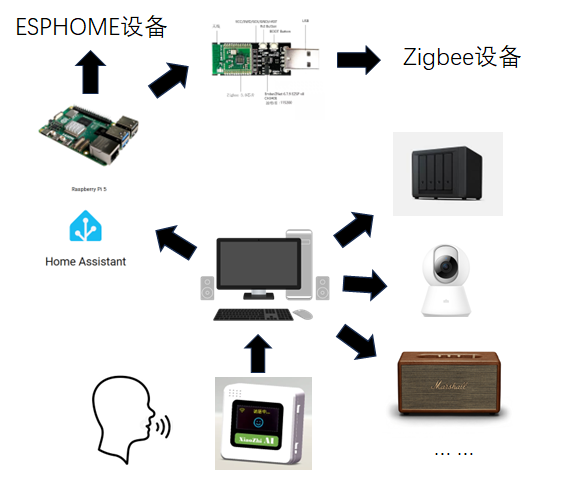
最近家里装修,所以打算做智能家居,用了HA+小智AI的方案。
设备框架图 概述: 总体而言借用各种开源项目,致力做到好用可控。输入设备小智AI作为用户前端,后端用小智AI华南理工开源服务器。智能家庭中控采用树莓派5搭载HAOS,用homeassistant,包括手机APP。各种终端设备,支持zigbee通信协议,wifi通信协议,小米设备支持milot的设备可以连接,其他类似美的海尔的设备也看home assistant的插件支持程度,没有本身开源的使用舒适。
主机: thinkpad-S5-yoga 地址:192.168.31.75 用户:kfzzzzzz
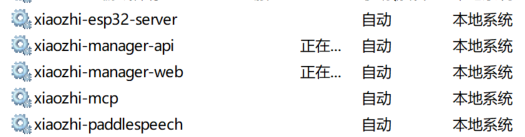
服务
备注
服务端口
frigate
5000
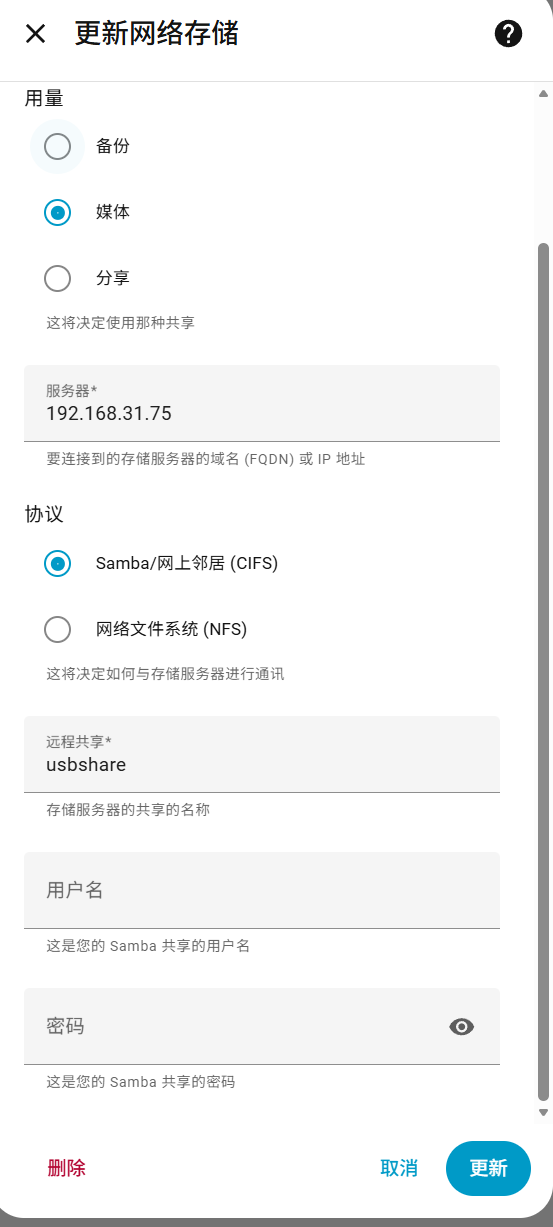
samba
mnt/media/usbshare
http
/mnt/usb_share/podcast
10086
mediamtx.service
rtsp://192.168.31.75/astra_color
8554
napcat
koi
miloco
micam
rtsp://192.168.31.75/xiaomi_camera_4C
astra-color.service
zaokafei-fetch.timer
/mnt/usb_share/podcast/zaokafei
bambucam.service
Desktop/bambustudio/bambucam
5004
glances.service
61208
主机: MacBookAir 地址:192.168.31.221 用户:kfzzzzzzz
服务
备注
服务端口
intel-color
ir
switch
Desktop/swtich_rtsp/swtich_rtsp.py
mediamtx
rtsp://192.168.31.221:8554/realsense
8554
主机: PC 地址:192.168.31.38 用户:kfzzzzzz
小智ESP32嵌入式前端 开源地址:78/xiaozhi-esp32: An MCP-based chatbot | 一个基于MCP的聊天机器人
前端若需要连M3.5的扬声器接口,可换PCM5102A模块
参考链接:用 ESP32 + PCM5102 打造一个无线的HIFI音乐播放器-CSDN博客
重新配置OTA地址,开机时按boot键
小智ESP32后端服务器 开源地址:xinnan-tech/xiaozhi-esp32-server: 本项目为xiaozhi-esp32提供后端服务,帮助您快速搭建ESP32设备控制服务器。Backend service for xiaozhi-esp32, helps you quickly build an ESP32 device control server.
连接home assistant采用了很多尝试ha-mcp-for-xiaozhi/README.md at v0.1.1 · c1pher-cn/ha-mcp-for-xiaozhi
也尝试用 xiaozhi-server贡献的home assistant代码,其实用了home assisttant的API,好处是可以精简MCP,对音乐播放进行了一些修改。
Home Assistant 树莓派地址:192.168.31.187:8000
公网访问
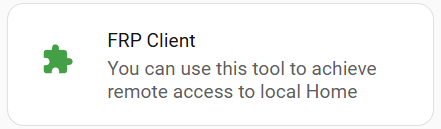
使用frp 加载项 内网穿透至阿里云服务器,再nginx反向代理出来。Frp内网穿透使用记录 - kfzzzzzz_blog
感觉有一个bug,重启HAOS之后,自启动FRP Clinet,但是FRP Server会还在重新尝试原先的客户端,就会崩溃。因此必须开崩溃自动恢复。
网络存储 此处用部署在局域网的samba服务,用户名:kfzzzzzz
Music Assistant 使用provider模式,youtube music等使用延迟较大,因此还是本地使用方案。
歌曲下载地址 SQUID.WTF - Home lucida | music at internet speed
使用 Filesystem provider
podcast收听地址 发现RSS真的还挺方便
使用podcast provider
链接:weekend-project-space/top-rss-list: 订阅人数最多的rss源,中文优质rss源
也可以自己抓取节目,小宇宙的音频都可以抓比较方便
抓取代码Desktop/zaokafei
1
2
3
4
5
6
7
8
9
10
11
12
13
14
15
16
17
18
19
20
21
22
23
24
25
26
27
28
29
30
31
32
33
34
35
36
37
38
39
40
41
42
43
44
45
46
47
48
49
50
51
52
53
54
55
56
57
58
59
60
61
62
63
64
65
66
67
68
69
70
71
72
73
74
75
76
77
78
79
80
81
82
83
84
85
86
87
88
89
90
91
92
93
94
95
96
97
98
99
100
101
102
103
104
105
106
107
108
109
110
111
112
113
114
115
116
117
118
119
120
121
122
123
124
125
126
127
128
129
130
131
132
133
134
135
136
137
138
139
140
141
142
143
144
145
146
147
148
149
150
151
152
153
154
155
156
157
158
159
160
161
162
163
164
165
166
167
168
169
170
171
172
173
174
175
176
177
178
179
180
181
182
183
184
185
186
187
188
189
190
191
192
193
194
195
196
197
198
199
200
201
202
203
204
205
206
207
208
#!/usr/bin/env python3 # -*- coding: utf-8 -*- import json import os import re from datetime import datetime, timezone from email.utils import format_datetime from urllib.parse import quote import requests import xml.etree.ElementTree as ET PODCAST_URL = "https://www.xiaoyuzhoufm.com/podcast/60de7c003dd577b40d5a40f3" # 音频/封面/XML 都放这里(U 盘) OUT_DIR = "/mnt/usb_share/podcast/zaokafei" XML_PATH = os.path.join(OUT_DIR, "zaokafei.xml") # 你这台 ThinkPad 的 HTTP 服务地址(用你确认的 IP) BASE_HTTP = "http://192.168.31.75:10086" HEADERS = { "User-Agent": "Mozilla/5.0 (Windows NT 10.0; Win64; x64)", } def get_next_data(url: str) -> dict: """从小宇宙网页里解析 __NEXT_DATA__ JSON""" html = requests.get(url, headers=HEADERS, timeout=30).text m = re.search( r'<script id="__NEXT_DATA__" type="application/json">(.*?)</script>', html, re.S, ) if not m: raise RuntimeError("没找到 __NEXT_DATA__,小宇宙页面结构可能变了") return json.loads(m.group(1)) def sanitize_filename(name: str) -> str: """文件名安全化(保留中文,但去掉不允许字符,避免太长)""" name = re.sub(r'[\\/:*?"<>|]', "_", name).strip() name = re.sub(r"\s+", " ", name) return name[:160] if len(name) > 160 else name def parse_pubdate_to_utc(pub: str) -> datetime: """ 解析小宇宙 pubDate(通常 ISO8601,可能带 Z) 返回 timezone-aware UTC datetime """ try: if pub.endswith("Z"): dt = datetime.fromisoformat(pub.replace("Z", "+00:00")) else: dt = datetime.fromisoformat(pub) if dt.tzinfo is None: dt = dt.replace(tzinfo=timezone.utc) return dt.astimezone(timezone.utc) except Exception: # 解析失败就用当前时间兜底(不影响下载,只影响 pubDate) return datetime.now(timezone.utc) def download_file(url: str, path: str): """流式下载,先写 .part 再原子替换""" r = requests.get(url, headers=HEADERS, stream=True, timeout=180) r.raise_for_status() tmp = path + ".part" with open(tmp, "wb") as f: for chunk in r.iter_content(chunk_size=1024 * 256): if chunk: f.write(chunk) os.replace(tmp, path) def ensure_xml_exists(): if os.path.exists(XML_PATH): return raise RuntimeError( f"找不到 {XML_PATH}\n" f"请先把 zaokafei.xml 放到 {OUT_DIR} 下(至少包含 <rss><channel>...</channel></rss>)" ) def xml_has_guid(root: ET.Element, guid: str) -> bool: for item in root.findall("./channel/item"): g = item.findtext("guid") if g and g.strip() == guid: return True return False def add_item_to_xml( title: str, guid: str, pub_dt_utc: datetime, enclosure_url: str, length_bytes: int, ): """ 把新一期插入到 XML 的最前面(靠前显示) 仅写入最必要字段:title/pubDate/guid/enclosure """ ET.register_namespace("itunes", "http://www.itunes.com/dtds/podcast-1.0.dtd") tree = ET.parse(XML_PATH) root = tree.getroot() channel = root.find("channel") if channel is None: raise RuntimeError("XML 里没找到 <channel>") if xml_has_guid(root, guid): print("XML 已存在该期 guid,跳过写入:", guid) return item = ET.Element("item") t = ET.SubElement(item, "title") t.text = title pub = ET.SubElement(item, "pubDate") pub.text = format_datetime(pub_dt_utc) # RFC 2822 g = ET.SubElement(item, "guid", attrib={"isPermaLink": "false"}) g.text = guid ET.SubElement( item, "enclosure", attrib={ "url": enclosure_url, "length": str(length_bytes), "type": "audio/mp4", }, ) # 插到最前面:放在第一个 item 前 first_item = channel.find("item") if first_item is None: channel.append(item) else: children = list(channel) idx = children.index(first_item) channel.insert(idx, item) tree.write(XML_PATH, encoding="UTF-8", xml_declaration=True) print("已更新 XML:", XML_PATH) def main(): os.makedirs(OUT_DIR, exist_ok=True) ensure_xml_exists() data = get_next_data(PODCAST_URL) podcast = data["props"]["pageProps"]["podcast"] latest = podcast["episodes"][0] eid = latest["eid"] title = latest["title"] pub_raw = latest.get("pubDate", "") # 音频 URL 兼容两种字段 audio_url = ( latest.get("media", {}).get("source", {}).get("url") or latest.get("enclosure", {}).get("url") ) if not audio_url: raise RuntimeError("没找到 media.source.url / enclosure.url") pub_dt_utc = parse_pubdate_to_utc(pub_raw) date_str = pub_dt_utc.strftime("%Y-%m-%d") safe_title = sanitize_filename(title) filename = f"{date_str} - {safe_title}.m4a" out_path = os.path.join(OUT_DIR, filename) # 先判断 XML 是否已经有 guid:有的话可以直接结束(更省事) # 但为了保险(避免 XML 手动改动),我们仍然会检查文件是否存在。 print("最新一期:", title) print("EID:", eid) print("发布时间(UTC):", pub_dt_utc.isoformat()) print("音频:", audio_url) if os.path.exists(out_path): print("文件已存在,跳过下载:", out_path) else: download_file(audio_url, out_path) print("下载完成:", out_path) # URL 编码文件名(中文/空格更稳) enclosure_url = f"{BASE_HTTP}{quote('/' + filename)}" length_bytes = os.path.getsize(out_path) add_item_to_xml( title=title, guid=eid, pub_dt_utc=pub_dt_utc, enclosure_url=enclosure_url, length_bytes=length_bytes, ) if __name__ == "__main__": main()
然后放一个xml文件
1
2
3
4
5
6
7
8
9
10
11
12
13
14
15
16
17
18
19
20
21
22
23
24
25
26
27
<?xml version='1.0' encoding='UTF-8'?> <rss xmlns:itunes="http://www.itunes.com/dtds/podcast-1.0.dtd" version="2.0"> <channel> <title>声动早咖啡</title> <link>http://192.168.31.75:10086/</link> <description> 一个十五分钟的晨间仪式,轻松同步日常生活与商业世界。 工作日早晨更新,来自声动活泼的清晨播客。 </description> <itunes:image href="http://192.168.31.75:10086/cover.png" /> <image> <url>http://192.168.31.75:10086/cover.png</url> <title>声动早咖啡</title> <link>http://192.168.31.75:10086/</link> </image> <item><title>咖啡豆|18 世纪就被誉为「全球最好」的美利奴羊毛,为何最近在国内热度大增?</title><pubDate>Thu, 08 Jan 2026 23:00:00 +0000</pubDate><guid isPermaLink="false">695fce90d4b8fa56f5f949fe</guid><enclosure url="http://192.168.31.75:10086/2026-01-08%20-%20%E5%92%96%E5%95%A1%E8%B1%86%EF%BD%9C18%20%E4%B8%96%E7%BA%AA%E5%B0%B1%E8%A2%AB%E8%AA%89%E4%B8%BA%E3%80%8C%E5%85%A8%E7%90%83%E6%9C%80%E5%A5%BD%E3%80%8D%E7%9A%84%E7%BE%8E%E5%88%A9%E5%A5%B4%E7%BE%8A%E6%AF%9B%EF%BC%8C%E4%B8%BA%E4%BD%95%E6%9C%80%E8%BF%91%E5%9C%A8%E5%9B%BD%E5%86%85%E7%83%AD%E5%BA%A6%E5%A4%A7%E5%A2%9E%EF%BC%9F.m4a" length="14036410" type="audio/mp4" /></item><item><title>图拉斯|必胜客推出独立汉堡门店,外卖大战补贴降温</title><pubDate>Wed, 07 Jan 2026 23:00:00 +0000</pubDate><guid isPermaLink="false">695e474fc1e012a7abdcfb1e</guid><enclosure url="http://192.168.31.75:10086/2026-01-07%20-%20%E5%9B%BE%E6%8B%89%E6%96%AF%EF%BD%9C%E5%BF%85%E8%83%9C%E5%AE%A2%E6%8E%A8%E5%87%BA%E7%8B%AC%E7%AB%8B%E6%B1%89%E5%A0%A1%E9%97%A8%E5%BA%97%EF%BC%8C%E5%A4%96%E5%8D%96%E5%A4%A7%E6%88%98%E8%A1%A5%E8%B4%B4%E9%99%8D%E6%B8%A9.m4a" length="16226181" type="audio/mp4" /></item><item><title>没有鱼子酱饮食传统的中国,为何成为全球鱼子酱的主要产地?</title><pubDate>Tue, 06 Jan 2026 23:00:00 +0000</pubDate><guid isPermaLink="false">695d07efc1e012a7abad496a</guid><enclosure url="http://192.168.31.75:10086/2026-01-06%20-%20%E6%B2%A1%E6%9C%89%E9%B1%BC%E5%AD%90%E9%85%B1%E9%A5%AE%E9%A3%9F%E4%BC%A0%E7%BB%9F%E7%9A%84%E4%B8%AD%E5%9B%BD%EF%BC%8C%E4%B8%BA%E4%BD%95%E6%88%90%E4%B8%BA%E5%85%A8%E7%90%83%E9%B1%BC%E5%AD%90%E9%85%B1%E7%9A%84%E4%B8%BB%E8%A6%81%E4%BA%A7%E5%9C%B0%EF%BC%9F.m4a" length="14320957" type="audio/mp4" /></item><item><title>山姆中国付费会员首次破千万,泡泡玛特将加速海外扩张</title><pubDate>Mon, 05 Jan 2026 23:00:00 +0000</pubDate><guid isPermaLink="false">695bafd9bdbeb6a09ee00719</guid><enclosure url="http://192.168.31.75:10086/2026-01-05%20-%20%E5%B1%B1%E5%A7%86%E4%B8%AD%E5%9B%BD%E4%BB%98%E8%B4%B9%E4%BC%9A%E5%91%98%E9%A6%96%E6%AC%A1%E7%A0%B4%E5%8D%83%E4%B8%87%EF%BC%8C%E6%B3%A1%E6%B3%A1%E7%8E%9B%E7%89%B9%E5%B0%86%E5%8A%A0%E9%80%9F%E6%B5%B7%E5%A4%96%E6%89%A9%E5%BC%A0.m4a" length="11324711" type="audio/mp4" /></item><item><title>频繁发射火箭的 SpaceX 今年上市,为什么星链服务是其价值关键?</title><pubDate>Sun, 04 Jan 2026 23:00:00 +0000</pubDate><guid isPermaLink="false">695a8775b9fb62614108f66e</guid><enclosure url="http://192.168.31.75:10086/2026-01-04%20-%20%E9%A2%91%E7%B9%81%E5%8F%91%E5%B0%84%E7%81%AB%E7%AE%AD%E7%9A%84%20SpaceX%20%E4%BB%8A%E5%B9%B4%E4%B8%8A%E5%B8%82%EF%BC%8C%E4%B8%BA%E4%BB%80%E4%B9%88%E6%98%9F%E9%93%BE%E6%9C%8D%E5%8A%A1%E6%98%AF%E5%85%B6%E4%BB%B7%E5%80%BC%E5%85%B3%E9%94%AE%EF%BC%9F.m4a" length="15438817" type="audio/mp4" /></item></channel>
把自己的文件夹地址代理出来就可以
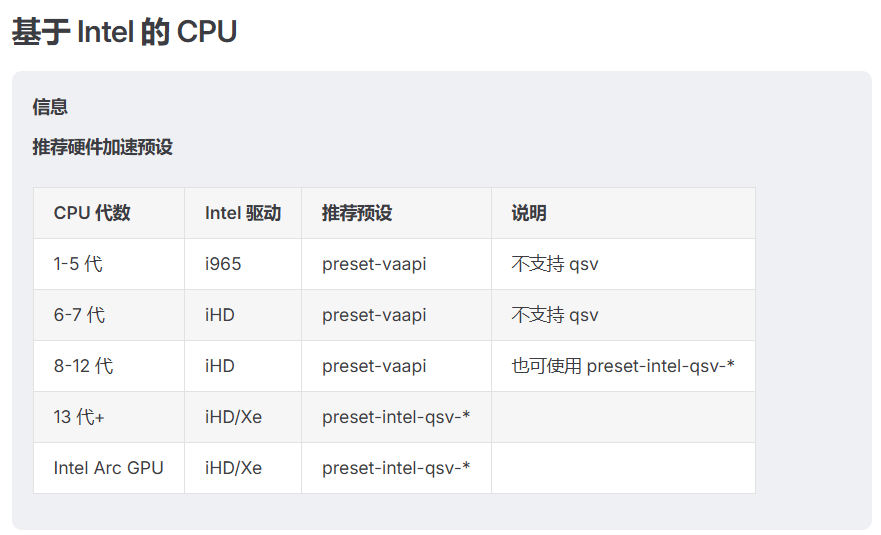
Frigate 摄像头管理NVR,目前我是跑在I5-5500U,M840上,其实无法硬解H265视频,并且做detect其实也比较吃力。Frigate中文文档 - Frigate 中文文档
视频硬解适配
intel cpu:
nvidia:Video Encode and Decode Support Matrix | NVIDIA Developer
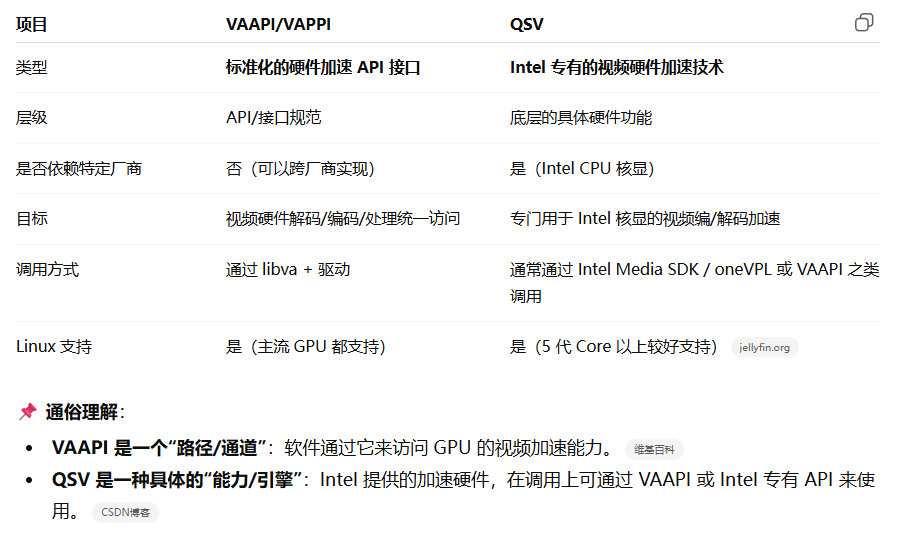
在我的配置中,用vappi对H264硬解,对H265软解
1 hwaccel_args: preset-vaapi
有时候会报错,需要指定设备及视频格式
1
2
3
4
5
6
7
8
9
10
11
12
13
hwaccel_args: - -hwaccel - vaapi - -hwaccel_device - /dev/dri/renderD128 - -hwaccel_output_format - yuv420p
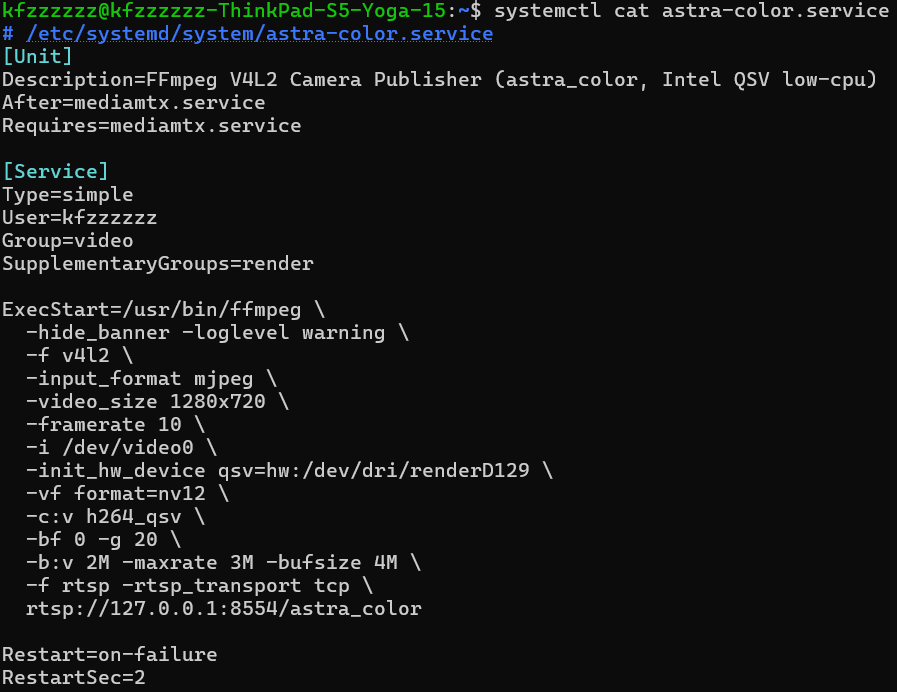
视频推流 rtsp推流,但是用qsv进行硬编码。
各种嵌入式设备 Marshall音箱 因为该音箱是一个有源音箱,连接方式有蓝牙和3.5mm连接两种
music assistant 安装 snapcast provider
在终端设备安装snapcast 客户端
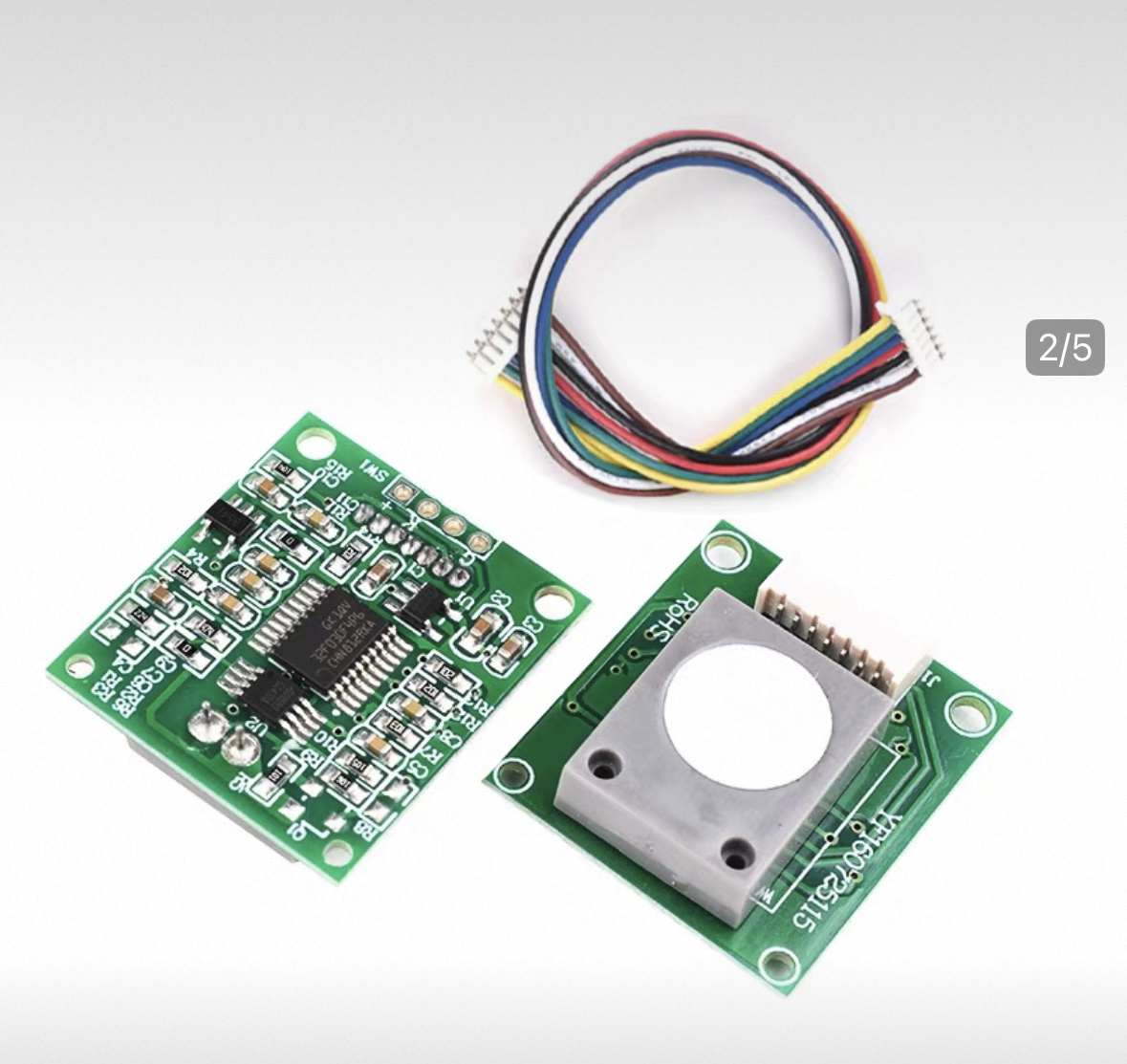
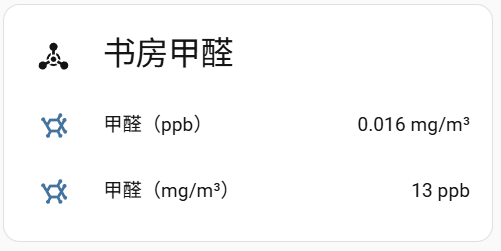
甲醛检测仪 使用ZH08 CH2O传感器,是电化学传感器
具体代码 ze08-ch2o.yaml
1
2
3
4
5
6
7
8
9
10
11
12
13
14
15
16
17
18
19
20
21
22
23
24
25
26
27
28
29
30
31
32
33
34
35
36
37
38
39
40
41
42
43
44
45
46
47
48
49
50
51
52
53
54
55
56
57
58
59
60
61
62
63
64
65
66
67
68
69
70
71
72
73
74
75
76
77
78
79
80
81
82
83
84
85
86
87
88
89
90
91
92
93
94
95
96
97
98
99
100
101
102
103
esphome: name: ze08-ch2o friendly_name: ZE08 CH2O esp32: board: esp32dev framework: type: arduino wifi: ssid: "402" password: "13858827998" logger: baud_rate: 0 api: ota: - platform: esphome external_components: - source: type: local path: components components: [ ze08_ch2o ] uart: id: uart_ze08 rx_pin: GPIO3 # 板子上 RX tx_pin: GPIO1 # 板子上 TX baud_rate: 9600 data_bits: 8 parity: NONE stop_bits: 1 ze08_ch2o: id: ze08_sensor uart_id: uart_ze08 ch2o_ppb: name: "CH2O (ppb)" ch2o_mg_m3: name: "CH2O (mg/m³)" sensor: - platform: template name: dummy_sensor id: dummy_sensor lambda: |- return 0.0; update_interval: 1h internal: true
init.py
1
2
3
4
5
6
7
8
9
10
11
12
13
14
15
16
17
18
19
20
21
22
23
24
25
26
27
28
29
30
31
32
33
34
35
36
37
38
39
40
41
42
43
44
45
46
47
48
49
50
51
52
53
54
55
56
57
58
59
60
61
62
63
64
65
66
67
68
69
70
71
72
73
74
75
import esphome.codegen as cg import esphome.config_validation as cv from esphome.components import uart, sensor from esphome.const import CONF_ID ze08_ns = cg.esphome_ns.namespace("ze08_ch2o") ZE08CH2OUart = ze08_ns.class_("ZE08CH2OUart", cg.Component, uart.UARTDevice) CONF_PPB = "ch2o_ppb" CONF_MGM3 = "ch2o_mg_m3" CONFIG_SCHEMA = cv.Schema( { cv.GenerateID(): cv.declare_id(ZE08CH2OUart), cv.Required(CONF_PPB): sensor.sensor_schema( unit_of_measurement="ppb", accuracy_decimals=0, icon="mdi:molecule", ), cv.Required(CONF_MGM3): sensor.sensor_schema( unit_of_measurement="mg/m³", accuracy_decimals=3, icon="mdi:molecule", ), } ).extend(uart.UART_DEVICE_SCHEMA).extend(cv.COMPONENT_SCHEMA) async def to_code(config): var = cg.new_Pvariable(config[CONF_ID]) await cg.register_component(var, config) await uart.register_uart_device(var, config) ppb = await sensor.new_sensor(config[CONF_PPB]) mgm3 = await sensor.new_sensor(config[CONF_MGM3]) cg.add(var.set_sensors(ppb, mgm3))
ze08_ch2o_uart.h
1
2
3
4
5
6
7
8
9
10
11
12
13
14
15
16
17
18
19
20
21
22
23
24
25
26
27
28
29
30
31
32
33
34
35
36
37
38
39
40
41
42
43
44
45
46
47
48
49
50
51
52
53
54
55
56
57
58
59
60
61
62
63
64
65
66
67
68
69
70
71
72
73
74
75
76
77
78
79
80
81
82
83
84
85
86
87
88
89
90
91
92
93
94
95
96
97
98
99
100
101
102
103
104
105
106
107
108
109
110
111
112
113
114
115
116
117
118
119
120
121
122
123
124
125
126
127
128
129
#pragma once #include "esphome/core/component.h" #include "esphome/components/uart/uart.h" #include "esphome/components/sensor/sensor.h" namespace esphome { namespace ze08_ch2o { class ZE08CH2OUart : public Component, public uart::UARTDevice { public: ZE08CH2OUart() : uart::UARTDevice(nullptr) {} explicit ZE08CH2OUart(uart::UARTComponent *parent) : uart::UARTDevice(parent) {} void set_sensors(sensor::Sensor *ppb, sensor::Sensor *mgm3) { ch2o_ppb_ = ppb; ch2o_mg_m3_ = mgm3; } void loop() override { while (available()) { uint8_t b = read(); if (idx_ == 0) { if (b != 0xFF) continue; buf_[idx_++] = b; continue; } buf_[idx_++] = b; if (idx_ >= 9) { parse_frame_(); idx_ = 0; } } } protected: sensor::Sensor *ch2o_ppb_{nullptr}; sensor::Sensor *ch2o_mg_m3_{nullptr}; uint8_t buf_[9]{0}; uint8_t idx_{0}; void parse_frame_() { // FF 17 04 dec hi lo fs_hi fs_lo checksum if (buf_[0] != 0xFF) return; if (buf_[1] != 0x17) return; // CH2O if (buf_[2] != 0x04) return; // ppb uint16_t sum = 0; for (int i = 1; i <= 7; i++) sum += buf_[i]; uint8_t cs = (uint8_t)(~(sum & 0xFF) + 1); if (cs != buf_[8]) return; uint16_t ppb = ((uint16_t) buf_[4] << 8) | buf_[5]; float mgm3 = (ppb / 1000.0f) * 1.25f; if (ch2o_ppb_) ch2o_ppb_->publish_state(ppb); if (ch2o_mg_m3_) ch2o_mg_m3_->publish_state(mgm3); } }; } // namespace ze08_ch2o } // namespace esphome
刷机页面 链接:Web - ESPHome
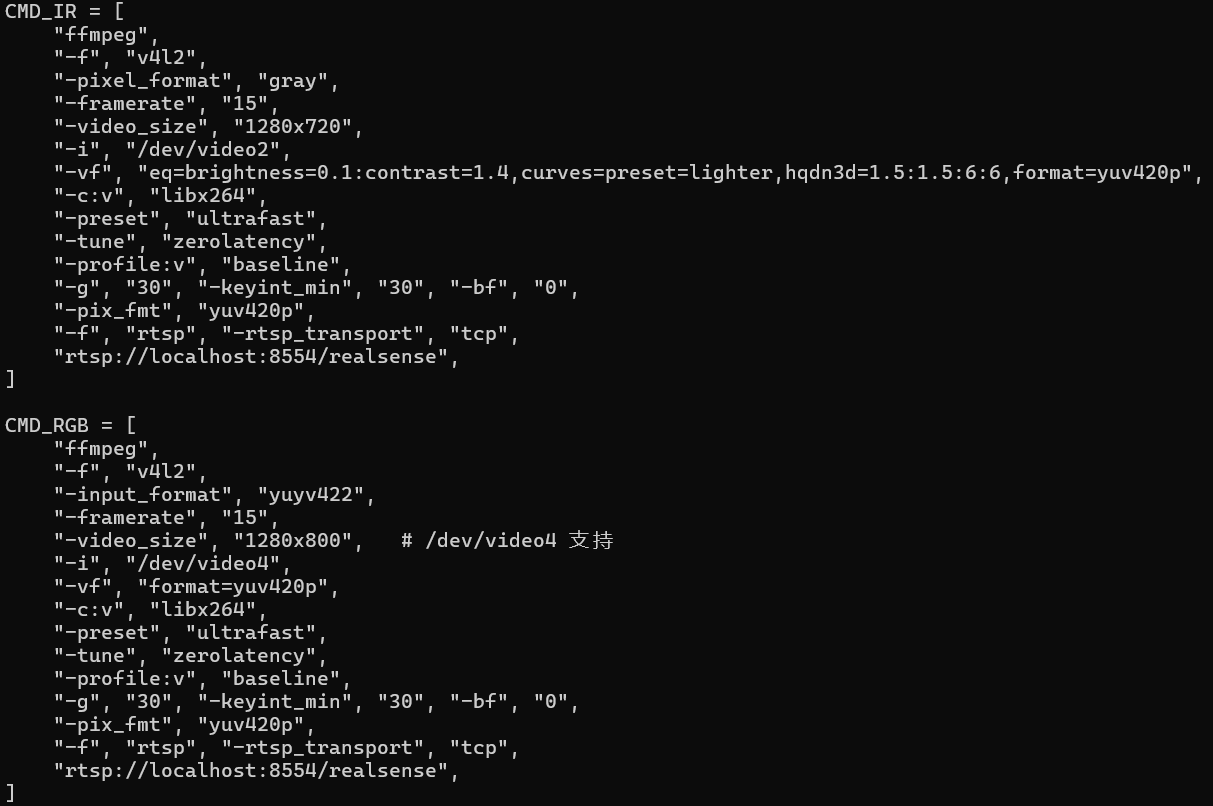
IntelRealsense摄像头/astra_color摄像头 采用qsv硬编码
夜视模式根据灰度直方图判断自动切换切换夜里用IR流和RGB流,同一个流输出
小米4C摄像头 由于小米摄像头本身无提供RTSP视频流,使用小米官方开源的miloco项目接受websocket流,之后三方的micam将此流转换为rtsp视频流,官方用go2rtc推流,我这边改用了mediamtx,另外小米4C为H265编码,docker运行
miloco 开源地址:XiaoMi/xiaomi-miloco: Xiaomi Miloco
micam 开源地址:miiot/micam: 🎦 Micam 是一个专为小米摄像头设计的 RTSP 桥接服务(非官方),能够将小米摄像头的视频流本地转推到RTSP服务器,支持接入 HomeAssistant、Go2rtc、Frigate、Scrypted、Homekit 等多种NVR和智能家居系统。该项目采用 Docker Compose 快速部署方案,基于小米官方的Miloco,并集成Go2rtc实现RTSP流服务,无需GPU即可运行,使小米摄像头能与各类主流智能家居平台无缝集成。
拓竹A1 mini 使用插件:Integration Overview
根据官方配置,能进行的操作似乎蛮多
开启局域网模式以后获取视频流方法
链接:jtessler/bambucam: Linux command line tool to access camera feed from a Bambu 3D printer
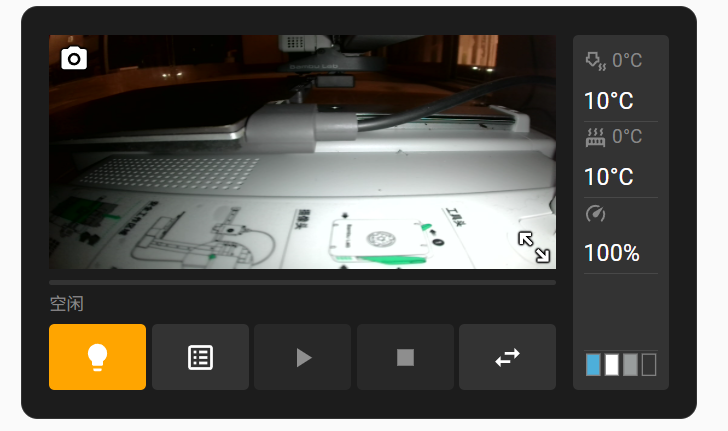
但我是A1 mini 似乎智能获取HTTP视频流,效果如下
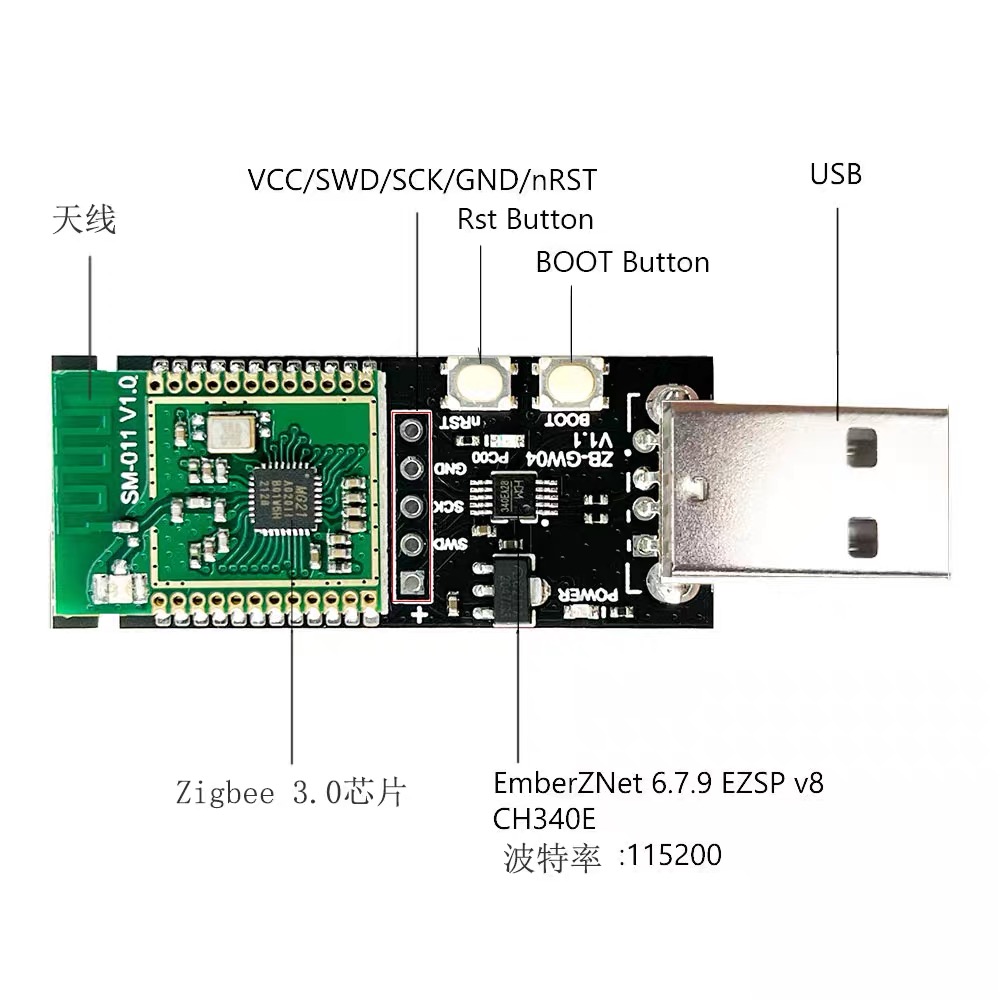
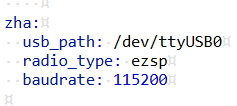
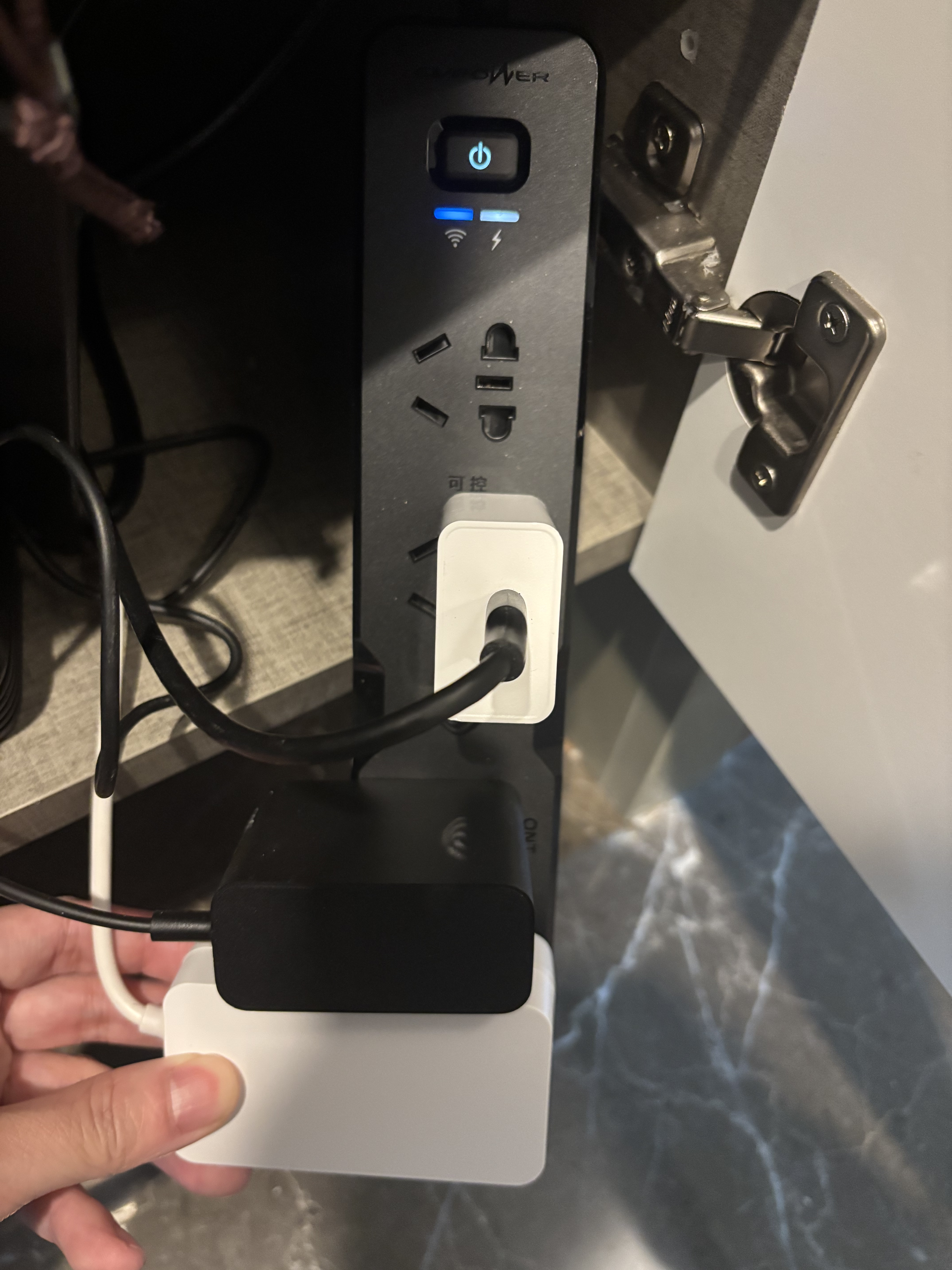
ESPHOME排插/MQTT插座/zigbee插座 淘宝购入zigbee信号接收器插在跑HA的树莓派上
在homeassistant/configuration.yaml 配置
终端设备淘宝非常多,几种通信协议的设备都能够支持,参考店家说明配置没啥难度
eyJhbGciOiJIUzI1NiIsInR5cCI6IkpXVCJ9.eyJpc3MiOiJlOGE5NTI2MjI3YTY0Y2E2OGVmNzM3Mzg2NTY4OTEyNiIsImlhdCI6MTc3NTcwMjY5NywiZXhwIjoyMDkxMDYyNjk3fQ.O_0wSHfRhLflEhXehnNa5YJnK59zc3krOD53JhX7c2o